
Build / Integration Guide / Wallet Creation and Management
4. Wallet Creation & Management
💡 Concept: Your exchange needs two types of wallets: a read-only monitoring wallet for tracking deposits, and a secure cold storage wallet for processing withdrawals.
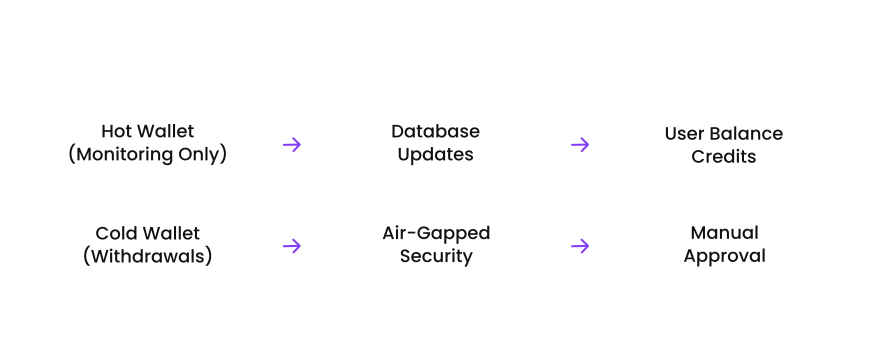
1. Create Monitoring Wallet
Pseudocode
FUNCTION createMonitoringWallet():
    // Step 1: Initialize wallet with secure passphrase
    passphrase = generateSecurePassphrase(256) // 256-bit entropy

    // Step 2: Create wallet identity
    TRY:
        walletIdentity = tariWallet.createIdentity(passphrase)

        // Step 3: Configure for monitoring only
        walletConfig = {
            name: "exchange-monitoring",
            grpc_enabled: true,
            grpc_address: "127.0.0.1:18143",
            grpc_authentication: {
                username: "exchange_monitor",
                password: generateSecurePassword()
            },
            base_node_service_peers: [trusted_node_address],
            network: "mainnet", // or "testnet"
            spending_key_access: false // Read-only
        }

        // Step 4: Generate deposit address
        depositAddress = walletIdentity.getOneSidedAddress()

        // Step 5: Store securely
        secureStorage.store({
            wallet_id: walletIdentity.public_key,
            deposit_address: depositAddress,
            grpc_credentials: walletConfig.grpc_authentication,
            created_at: getCurrentTimestamp()
        })

        // Step 6: Start monitoring service
        startWalletSync()

        RETURN {
            address: depositAddress,
            wallet_id: walletIdentity.public_key,
            status: "ready_for_deposits"
        }

    CATCH (error):
        LOG "Wallet creation failed: " + error.message
        THROW "Failed to create monitoring wallet"
grpcurl Test
# Confirm the monitoring wallet's gRPC endpoint is reachable
grpcurl -plaintext localhost:18143 tari.rpc.Wallet/GetVersion

# Get the wallet's identity (public key and addresses)
grpcurl -plaintext localhost:18143 tari.rpc.Wallet/Identify

# Get a one-sided address for deposit monitoring
grpcurl -plaintext localhost:18143 tari.rpc.Wallet/GetCompleteAddress
Setup Commands
# Create the monitoring wallet with a generated passphrase
minotari_console_wallet --init --network mainnet
  --wallet-name exchange-monitoring
  --passphrase-file /etc/tari/wallet-passphrase.secret

# Enable gRPC for programmatic access (localhost only)
minotari_console_wallet --grpc-enabled
  --grpc-address 127.0.0.1:18143
  --base-node PLACEHOLDER_trusted_node_address

# Verify the wallet is syncing
tail -f ~/.tari/mainnet/log/wallet.log
2. Cold Storage Wallet Setup
🔒 Security Critical: The cold storage wallet should be on an air-gapped system or secure hardware wallet for maximum security.
Pseudocode
FUNCTION setupColdStorageWallet():
    // Step 1: Air-gapped environment validation
    IF (networkConnected() OR usbDevicesConnected()):
        THROW "Environment not sufficiently isolated"

    // Step 2: Generate seed phrase securely
    seedPhrase = generateMnemonic(24) // 24-word BIP39 mnemonic
    validateMnemonic(seedPhrase)

    // Step 3: Create physical backup
    printSeedPhrase(seedPhrase) // On paper, never digital
    createMetalBackup(seedPhrase) // Fire/water resistant

    // Step 4: Initialize wallet from seed
    coldWallet = createWalletFromSeed(seedPhrase)

    // Step 5: Generate multiple addresses for rotation
    addresses = []
    FOR i = 0 TO 9:
        address = coldWallet.deriveAddress(i)
        addresses.append(address)

    // Step 6: Export public keys only for monitoring
    publicKeys = []
    FOR EACH address IN addresses:
        publicKeys.append(address.getPublicKey())

    // Step 7: Secure the seed
    securelyDestroySeedFromMemory()
    storeInSecureSafe(seedPhrasePaper)

    // Step 8: Create watch-only wallet for hot system
    watchOnlyWallet = createWatchOnlyWallet(publicKeys)

    RETURN {
        watch_only_keys: publicKeys,
        addresses: addresses,
        backup_completed: true
    }
Setup Process
# Perform this entire process on an air-gapped machine

# 1. Generate a 24-word BIP39 mnemonic offline
tari_offline_keygen --words 24 --output /media/usb/seed-phrase.txt

# 2. Create the cold wallet from the seed (never online)
minotari_console_wallet --recover-from-seed-file /media/usb/seed-phrase.txt
  --wallet-name cold-storage --offline

# 3. Derive watch-only public keys for the hot system
minotari_console_wallet --export-view-key --wallet-name cold-storage
  --output /media/usb/view-key.txt

# 4. Transfer view-key.txt to the hot system via a fresh USB drive
# 5. Securely wipe the seed phrase file from the air-gapped machine
shred -u /media/usb/seed-phrase.txt
Security Measures
- Keep the air-gapped machine permanently disconnected from any network and disable Wi-Fi/Bluetooth hardware
- Store the physical seed phrase backup (paper and metal) in a fireproof safe, ideally split across two locations
- Require multi-signature (for example 3-of-5) approval before any cold wallet transaction is signed
- Rotate withdrawal addresses periodically and never reuse a cold storage address for monitoring
- Log and audit every physical access to the air-gapped hardware and safe